
Custom CommandCustom Command
Dashboard
Discord
GitHub
Dashboard
Discord
GitHub
  • Guide

    • Getting Started
    • Creating Custom Commands
    • Syntax
    • Code and Comments
    • Using Variables
    • Using Arrays
    • Using Templates
    • Frequently Asked Questions
  • Trigger Types

    • Triggers showcase
    • Button Click
    • Channel add/remove
    • On Join/Leave
    • Library
    • Menu Interaction
    • Modal (Form) Interaction
    • Poll Updates Trigger
    • User Reaction
    • Role Given/Taken
    • Scheduled Event Updates Trigger
    • On Server Boost
    • Slash Command
    • Timed or Interval
    • On Timeout
    • Voice Join/Leave
    • Word Trigger
  • Tutorials & Examples

    • Ping command
    • Staff application
    • Report command
    • Collect reward
    • Simple Slash Command: Confession
    • Sending a poll
  • Other Information

    • Setting Up Your Custom Bot
    • Curl Arguments
    • Creating Embeds with the Embed Builder
    • Understanding Discord Rate Limits and Bot Cooldowns
    • Troubleshooting
    • Useful Information
    • Setting Up Welcomer
  • Changelogs

    • v1
    • V1.4.4
  • Functions

    • Member Functions

      • $authorAvatar
      • $authorID
      • $ban
      • $blackListIDs
      • $boostingSince
      • $changeNickname
      • $discriminator
      • $displayName
      • $eventNewNickname
      • $eventOldNickname
      • $findMember
      • $getUserBadges
      • $globalName
      • $hasAnyPerm
      • $hasAnyRole
      • $hasPerms
      • $hasRoles
      • $isBanned
      • $isUserDMEnabled
      • $kick
      • $memberSearch
      • $membersWithStatus
      • $mention
      • $moveUser
      • $muteUser
      • $nickname
      • $status
      • $unban
      • $user
      • $userAvatar
      • $userBanner
      • $userConnectedVC
      • $userExists
      • $userID
      • $userPerms
      • $userReacted
      • $userRoleColor
      • $userRoles
      • $userTag
      • $username
      • $usersBanned
      • $usersInChannel
      • $usersTyping
      • $usersWithRole
    • Channel Functions

      • $blackListChannelIDs
      • $cacheChannelMessages
      • $categoryChannels
      • $channel
      • $channelCategoryID
      • $channelCount
      • $channelExists
      • $channelID
      • $channelName
      • $channelPermissionsFor
      • $channelTopic
      • $channelType
      • $channelUsed
      • $clear
      • $cloneChannel
      • $closeTicket
      • $createChannel
      • $createForum
      • $deleteChannels
      • $editChannel
      • $editForum
      • $eventChannelID
      • $eventChannelParent
      • $findChannel
      • $findServerChannel
      • $getChannelMessages
      • $getChannelSlowmode
      • $latestMessage
      • $mentionChannel
      • $modifyChannelPerms
      • $newTicket
      • $removeContains
      • $serverChannels
      • $setChannelTopic
      • $slowmode
      • $transcriptChannel
      • $useChannel
      • $vcAfter
      • $vcBefore
      • $voiceChannelID
    • Message Functions

      • $DM
      • $addCmdReactions
      • $addMessageReactions
      • $addReactions
      • $argsCheck
      • $argsCount
      • $awaitMessage
      • $channelSendMessage
      • $clearReaction
      • $clearReactions
      • $createWebhook
      • $deleteCommand
      • $deleteIn
      • $deleteMessage
      • $deleteWebhook
      • Delete Webhook Message
      • $disableChannelMentions
      • Disable @everyone Mentions
      • $disableRoleMentions
      • $editEmbed
      • $editIn
      • $editMessage
      • $editWebhookMessage
      • $emoji
      • $emojiID
      • $emojiName
      • $emojiToString
      • $emojisFromMessage
      • Enable @everyone Mentions
      • $forwardMessage
      • $getCommandOption
      • $getEmbed
      • $getMessage
      • $getMessageReactions
      • $getReactionCount
      • $getReactions
      • $hasEmbeds
      • $hyperlink
      • $message
      • $messageAttachment
      • $messageExists
      • $messageFlags
      • $messageID
      • $messagePublish
      • $messageSlice
      • $messageType
      • $messageWebhookID
      • Modify Webhook
      • $msg
      • $noEscapingMessage
      • $noMentionMessage
      • $pinMessage
      • $poll
      • $referenceChannelID
      • $referenceMessageID
      • $reply
      • $sendCrosspostingMessage
      • $sendDM
      • $sendMessage
      • $sendWebhook
      • $sentMessageID
      • $unpinMessage
      • $webhookExists
    • Interaction Functions

      • $commandName
      • $getOption
      • $interactionDelete
      • $interactionEdit
      • $interactionId
      • $interactionReply
      • $modal
      • $modalAnswer
      • $modalID
    • Threads Functions

      • $addUsersToThread
      • $archiveThread
      • $closePost
      • $createPost
      • $createThread
      • $deletePost
      • $deletePosts
      • $deleteThreads
      • $editPost
      • $editThread
      • $getThreads
      • $joinThreads
      • $leaveThreads
      • $lockPost
      • $lockThread
      • $pinPost
      • $removeUsersFromThread
      • $thread
    • Role Functions

      • $blackListRoleIds
      • $colorRole
      • $createRole
      • $deleteRoles
      • $findRole
      • $getRoleColor
      • $giveRoles
      • $guildRoles
      • $hasRole
      • $highestRole
      • $highestServerRole
      • $lowestRole
      • $lowestServerRole
      • $mentionRole
      • $modifyRole
      • $modifyRolePerms
      • $modifyUserRoles
      • $role
      • $roleCount
      • $roleExists
      • $roleID
      • $roleIcon
      • $roleMembersCount
      • $roleName
      • /Role/rolePerms
      • $rolePosition
      • $setRoles
      • $takeRoles
      • $toggleRoles
    • Server Functions

      • $addEmoji
      • $allMembersCount
      • $createAutomodKeyword
      • $deleteAutomod
      • $deleteEmojis
      • $editAutomodKeyword
      • $emojiCount
      • $emojiExists
      • $getInviteInfo
      • $getServerInvite
      • $guild
      • $membersCount
      • $ownerID
      • $resolveEmojiID
      • $securityPause
      • $serverBanner
      • $serverBoostCount
      • $serverBoostLevel
      • $serverContentFilter
      • $serverDescription
      • serverEmojis
      • serverFeatures
      • $serverIcon
      • $serverName
      • $serverRegion
      • $serverSplash
      • $serverVerificationLevel
      • $setGuildIcon
      • $setGuildName
      • $systemChannelID
    • Random Functions

      • $random
      • $randomChannelID
      • $randomMention
      • $randomRoleID
      • $randomString
      • $randomText
      • $randomTextBiased
      • $randomUserID
      • $resetRandom
    • Text Functions

      • $buffer
      • $channelNSFW
      • $charCount[text]
      • $checkContains
      • $customEmoji
      • $disableMentions
      • $filterMessage
      • $filterMessageWords
      • $findChars
      • $findNumbers
      • $findSpecialChars
      • $indexOf
      • $isChannelMention
      • $isUserMention
      • $mentionType
      • $mentioned
      • $mentionedChannels
      • $mentionedRoles
      • $noMentionMessage
      • $numToWord
      • $numberSeparator
      • $padLeft
      • $padRight
      • $repeatMessage
      • $replaceText
      • $stringEndsWith
      • $stringStartsWith
      • $textLength
      • $textShuffle
      • $textSlice
      • $textTrim
      • $toLocaleUppercase[text]
      • $toLowercase[text]
      • $toUppercase[text]
      • $uri
      • $void
    • Condition Functions

      • $checkCondition
      • $conditional
      • $else
      • $elseif
      • $endIf
      • $endelseif
      • $if
    • Sticker Functions

      • $createSticker
      • $deleteSticker
      • $editSticker
      • $messageStickers
      • $serverStickers
      • $sticker
    • Event Functions

      • $eventCreate
      • $eventDelete
      • $eventEdit
      • $eventEnd
      • $eventExists
      • $eventStart
      • $getEventInfo
      • $getEventUsers
      • $guildEvents
    • User Timeout Functions

      • $timeoutAction
      • $timeoutBy
      • $timeoutReason
      • $userGetTimeout
      • $userRemoveTimeout
      • $userSetTimeout
    • Embed functions

      • $addField
      • $addTimestamp
      • $attachment
      • $author
      • $color
      • $description
      • Complete Embed
      • $footer
      • $image
      • $thumbnail
      • $title
    • Button Functions

      • $addButton
      • $addMenu
      • $awaitButton
      • $awaitMenu
      • $button
      • $buttonEmoji
      • $buttonID
      • $buttonIsDisabled
      • $buttonLabel
      • $buttonStyle
      • $buttonURL
      • $disableButton
      • $disableButtons
      • $disableMenu
      • $editButton
      • $editMenu
      • $enableButtons
      • $enableMenu
      • $eventSelected
      • $menuID
      • $removeButton
      • $removeButtons
      • $removeEmbed
      • $removeMenu
      • $selectMenu
    • Math Functions

      • $abbreviate
      • $abs
      • $ceil
      • $divide
      • $floor
      • $math
      • $mathMax
      • $mathMin
      • $modulo
      • $multi
      • $ordinal
      • $round
      • $roundTenth
      • $sub
      • $sum
      • $truncate
    • Text Split Functions

      • $advancedTextSplit
      • $concatTextSplit
      • $editTextSplitElement
      • $findTextSplitIndex
      • $getTextSplitLength
      • $joinSplitText
      • $removeSplitTextElement
      • $removeTextSplitElement
      • $spliceTextJoin
      • $splitText
      • $textSplit
    • Array Functions

      • $arrayClear
      • $arrayConcat
      • $arrayCount
      • $arrayCreate
      • $arrayElementCount
      • $arrayFilter
      • $arrayGet
      • $arrayInclude
      • $arrayJoin
      • $arrayLength
      • $arrayLoop
      • $arrayMap
      • $arrayPop
      • $arrayPush
      • $arrayRemove
      • $arrayReverse
      • $arraySearch
      • $arraySet
      • $arrayShift
      • $arrayShuffle
      • $arraySlice
      • $arraySort
      • $arrayUnique
      • $arrayUnshift
    • Object Functions

      • $objectCreate
      • $objectGet
      • $ObjectIncrease
      • $ObjectKeyExists
      • $ObjectKeys
      • $ObjectLoop
      • $ObjectMerge
      • $ObjectRemove
      • $ObjectRenameKey
      • $objectSet
      • $ObjectValues
      • $addObjectProperty
      • $createObject
      • $getObject
      • $getObjectKeys
      • $getObjectProperty
    • Is and Has Functions

      • $isBoosting
      • $isbot
      • $isConnected
      • $isDeafened
      • $isEmoji
      • $isHoisted
      • $isManaged
      • $isMentionable
      • $isMentioned
      • $isMuted
      • $isNumber
      • $isStreaming
      • $isTicket
      • $isValidHex
      • $isValidInvite
      • $isValidLink
      • $isValidObject
    • Only Functions

      • $onlyBotPerms
      • $onlyForCategories
      • $onlyForChannels
      • $onlyForIDs
      • $onlyForRoles
      • $onlyIf
      • $onlyIfMessageContains
      • $onlyNSFW
      • $onlyPerms
    • Regex Functions

      • $regexCheck
      • $regexMatch
      • $regexReplace
      • $replaceTextWithRegex
    • Date Functions

      • $creationDate
      • $dateStamp
      • $dateToTime
      • $day
      • $formatDate
      • $hour
      • $humanizeMS
      • $memberJoinedCode
      • $memberJoinedDate
      • $minute
      • $month
      • $parseDate
      • $parseTime
      • $second
      • $timeStamp
      • $timeToDate
      • $timezone
      • $year
    • Variables Functions

      • $deleteChannelVar
      • $deleteMessageVar
      • $deleteServerVar
      • $deleteUserVar
      • $get
      • $getChannelVar
      • $getMessageVar
      • $getServerVar
      • $getUserVar
      • $increaseChannelVar
      • $increaseServerVar
      • $increaseUserVar
      • $initVar
      • $let
      • $resetUserVar
      • $setChannelVar
      • $setMessageVar
      • $setServerVar
      • $setUserVar
      • $userLeaderboard
      • $userVarRank
      • $viewChannelVars
      • $viewServerVars
      • $viewUserVars
    • Bot Functions

      • $botCount
      • $botOwnerID
      • $botPing
      • $botTier
      • $botTyping
      • $botVerified
      • $botVersion
      • $cacheMember
      • $clientID
      • $cpu
      • $executionTime
      • $getBotActivity
      • $getBotInvite
      • $maxRam
      • $ping
      • $ram
      • $serverCount
      • $setBotActivity
      • $uptime
    • Useful Functions

      • $callFunction
      • $commandCode
      • $deleteTrigger
      • $editTrigger
      • $endForEach
      • $endFunction
      • $endTimeout
      • $error
      • $forEach
      • $function
      • $getToken
      • $getTrigger
      • $ignoreErrors
      • $includeLibrary
      • $jsonRequest
      • $redirectErrors
      • $return
      • $seq
      • $setTimeout
      • $spread
      • $stop
      • $suppressErrors
      • $triggerExists
      • $wait
    • Cooldown functions

      • $channelCooldown
      • $clearCooldown
      • $cooldown
      • $getCooldownTime
      • $serverCooldown
    • Http Requests functions

      • $httpRequest
      • $httpRequestHeader
      • $httpRequestStatus
    • Image Builder functions

      • $imageBorderRad
      • $imageCreate
      • $imageCrop
      • $imageDraw
      • $imageDrawBack
      • $imageFill
      • $imageHeight
      • $imageLineHeight
      • $imageLoadEmoji
      • $imageLoadFromURL
      • $imageOutput
      • $imagePositionBase
      • $imageSetOpacity
      • $imageStroke
      • $imageStrokeWidth
      • $imageTextAlign
      • $imageTextBaseline
      • $imageTextColor
      • $imageTextFill
      • $imageTextFillColor
      • $imageTextSize
      • $imageTextStroke
      • $imageTextStrokeColor
      • $imageTextWeight
      • $imageUseFont
      • $imageWidth
  • Contribute

    • Templating System
    • Function Template
    • Contributing to the Documentation
  • Legal

    • Privacy Policy
    • Terms of Service

Word Trigger

Word commands, also known as message commands are executed when the bot receives a text message.

Basic word command

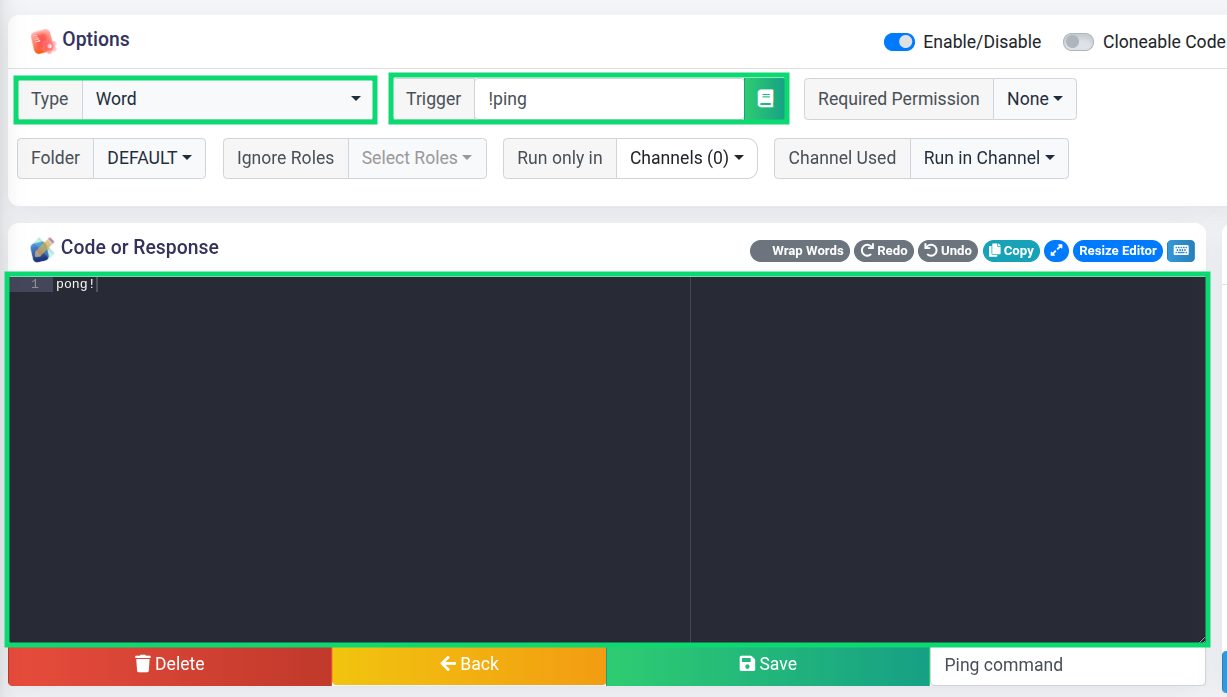
Let's create a word command with a trigger !ping, this means the command will be triggered whenever someone sends a message starting with !ping. In the code part we will type pong!, so the bot will respond with it.
Word example

Member08/02/2026
!ping
Custom Command Bot 08/02/2026
pong!

Using parameters

A crucial feature of the word type are parameters. They are data provided when executing the command.

Let's say we had a ?hug command, which users can use to hug other users. In that case we would want users to select a user by mentioning him.

Usage

The mention will be the parameter 1, because users will mention their victim right after the ?hug keyword.

Member08/02/2026
?hug @fajfaj

Setup

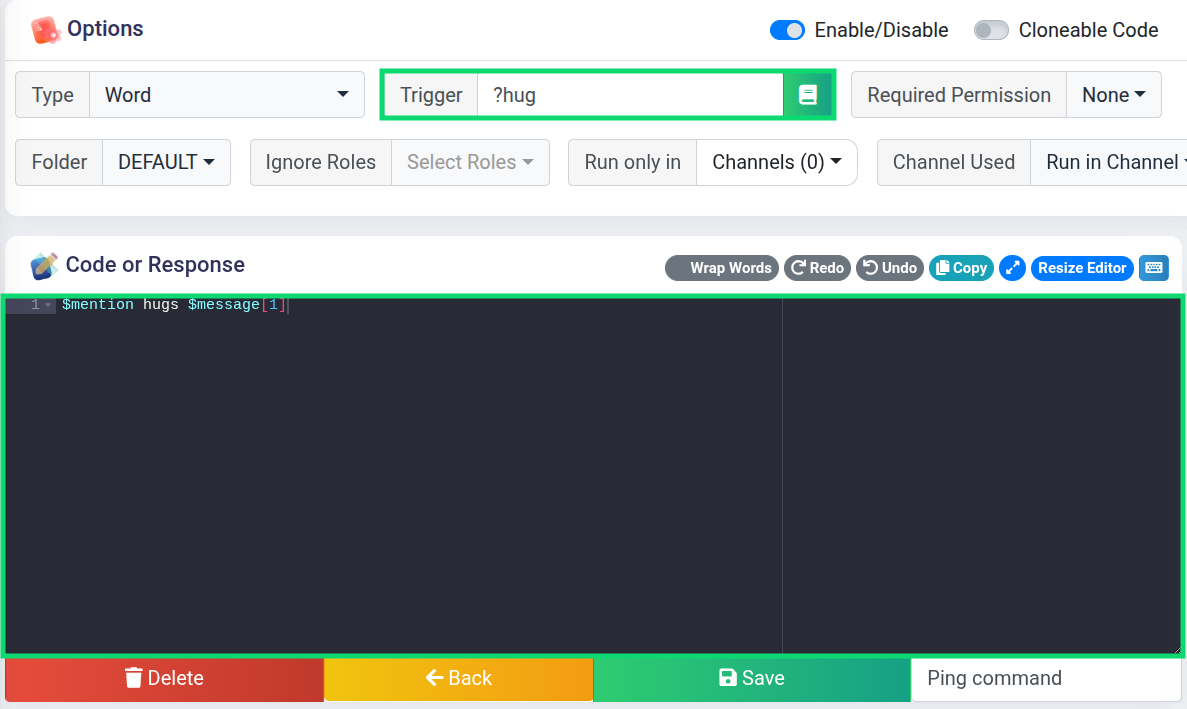
Parameters can be retrieved using the $message function, we will use it to get the user mention:
?hug code

Result

Here's how the final command should look like:

Member08/02/2026
?hug @fajfaj
Custom Command Bot 08/02/2026
@Member hugs @fajfaj

Case insensitivity

Sometimes we don't want to bother users with using correct capitalisation.

How does it work?

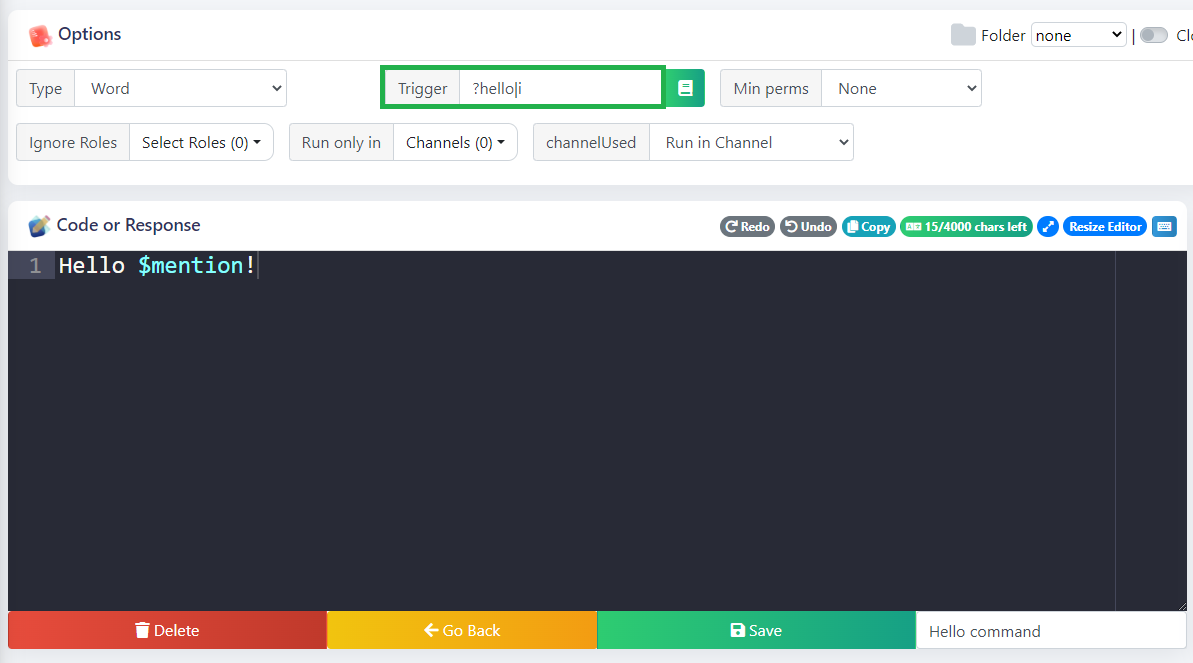
Case sensivity can be disabled by adding |i after the trigger. In our case ?hello will be changed to ?hello|i

Example

Here's how to make a case insensitive ?hello command, that will respond with a simple Hello @user message.
?hello command

Let's test different variations:

Member08/02/2026
?hello
Custom Command Bot 08/02/2026
Hello @Member!
Member08/02/2026
?HELLO
Custom Command Bot 08/02/2026
Hello @Member!
Member08/02/2026
?HeLLo
Custom Command Bot 08/02/2026
Hello @Member!

Works perfectly!

Multiple words

Sometimes we want the bot to trigger on multiple words, by separating them with |

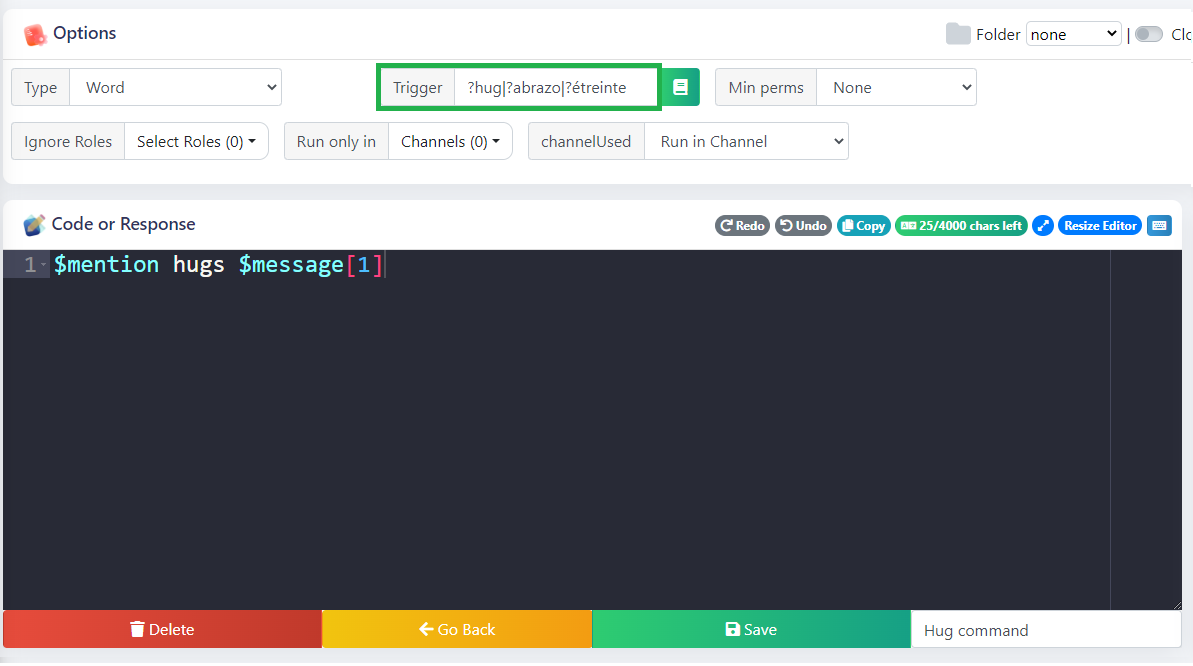
Let's say we want our Hug command to trigger on: ?hug, ?abrazo, and ?étreinte.

How can we do that?

We can do that with the following trigger:

?hug|?abrazo|?étreinte
Let's test it out:

Member08/02/2026
?hug @fajfaj
Custom Command Bot 08/02/2026
@Member hugs @fajfaj
Member08/02/2026
?abrazo @fajfaj
Custom Command Bot 08/02/2026
@Member hugs @fajfaj
Member08/02/2026
?étreinte @fajfaj
Custom Command Bot 08/02/2026
@Member hugs @fajfaj

Works as expected!

Regex match

The word trigger can also contain regex expressions for various dynamic triggers.

What's regex?

Don't worry if you don't know what it is. Regex is a pretty advanced topic, and is not necessary in most cases.

However if you want to learn more about regex, you can learn it from some internet guides like this one and regex playgrounds like this one.

Ping detector

Regex has thousands of use cases, but here we will discuss using regex to trigger on a mention anywhere in the message.

User mentions

Bots can only see mentions as a string like: <@434342521997492224>, or <@!434342521997492224>, so we have to design our expression to catch this form.

Trigger

Here is the expression which we are going to use:

  • ? - the previous character is optional
  • \d - any number
  • {18,} - the previous character has to appear 18 or more times
/<@!?\d{18,}>/

You need to add a forward slash before and after your expression, otherwise the bot will only reply when you literally send <@!?\d{18,}> in your message
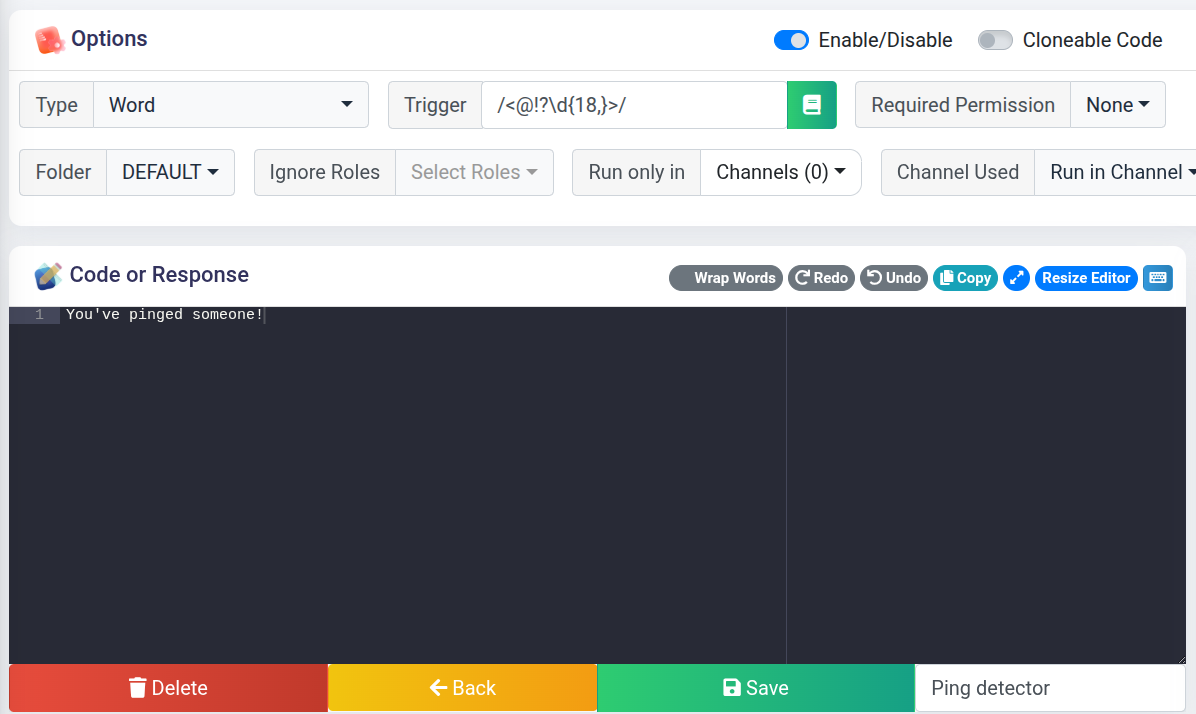
Ping detector

Let's try sending some mentions:

Member08/02/2026
Hey @fajfaj! How is it going?
Custom Command Bot 08/02/2026
You've pinged someone!
Member08/02/2026
@Mido, have you found your chocolate yet?
Custom Command Bot 08/02/2026
You've pinged someone!

It detects all of them!

Trigger when a message has attachment

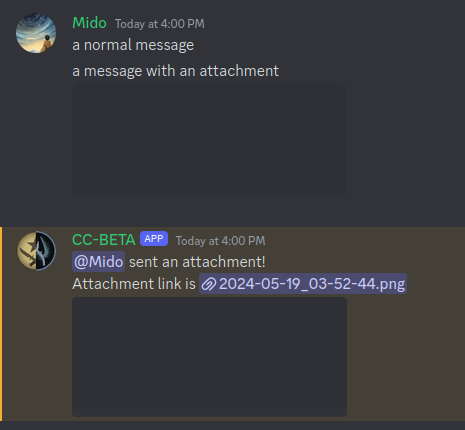
This can be done using %has_attachment% as trigger, it makes the command execute when a message contains an attachment.

Example
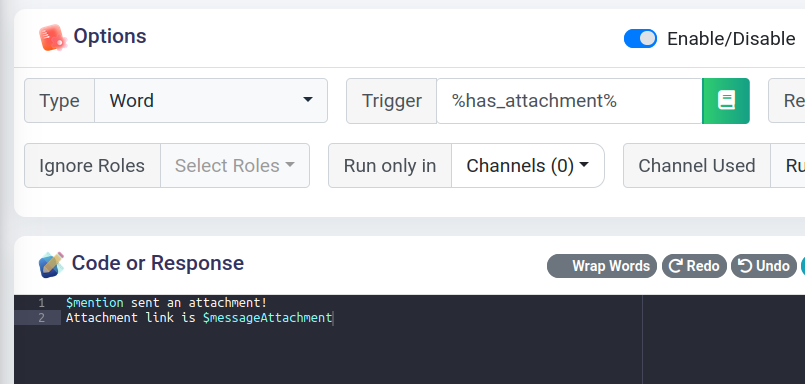
Output
Trigger when pinned message is sent

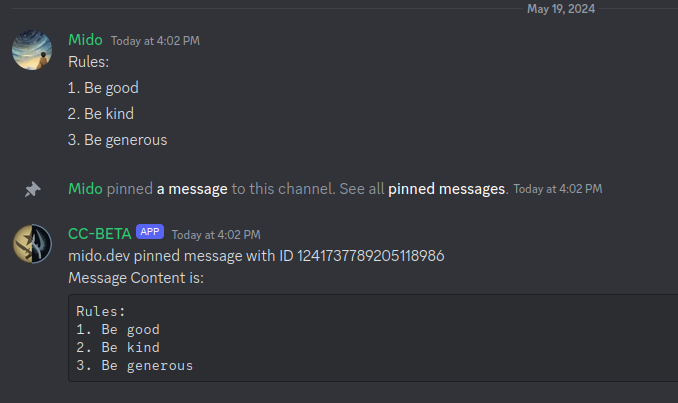
This can be done using %pin% as trigger, it makes the command execute when discord send a message when a message get pinned.

Example
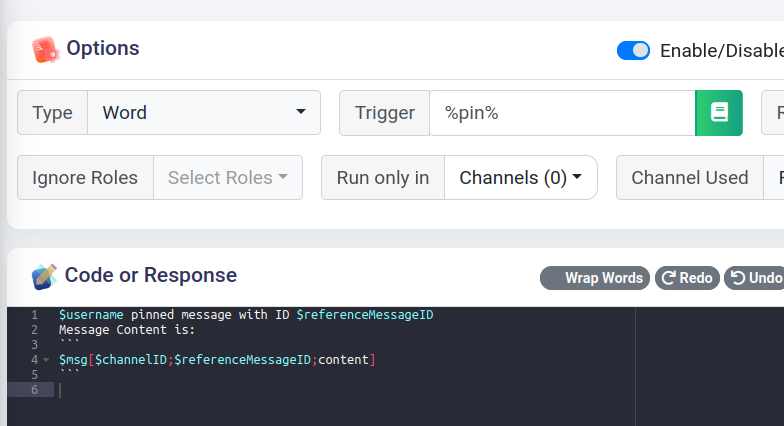
Output
Trigger when thread is created

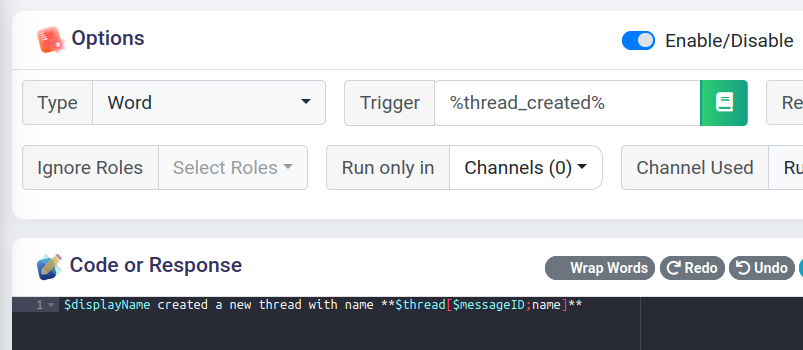
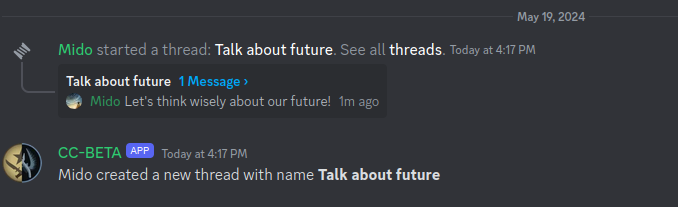
This can be done using %thread_created% as trigger, it makes the command execute when discord send a message when a thread get created.

Example
Output
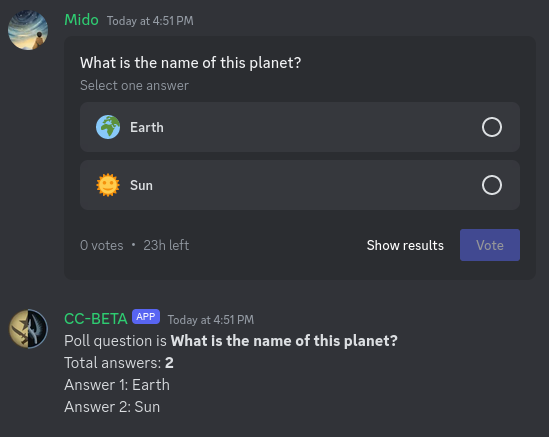
Trigger when a poll is sent

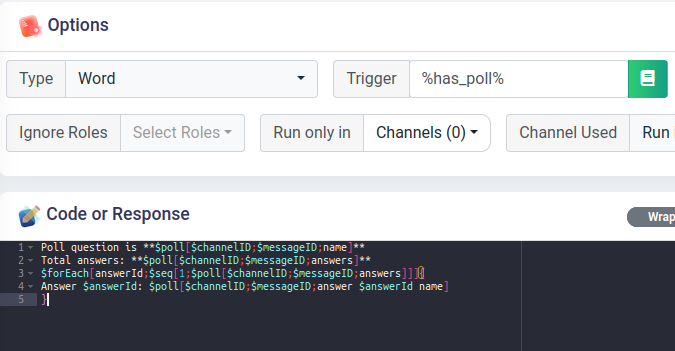
This can be done using %has_poll% as trigger, it makes the command execute when a user send a poll.

Example
Output
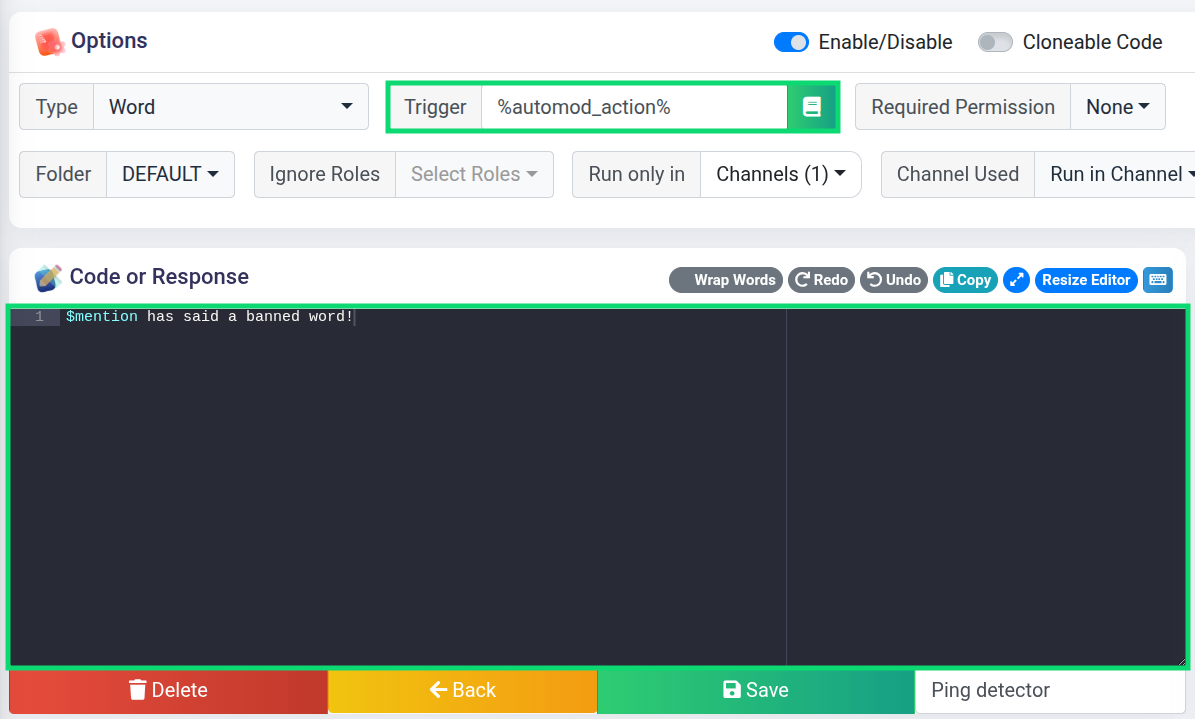
Trigger on Discord AutoMod Action

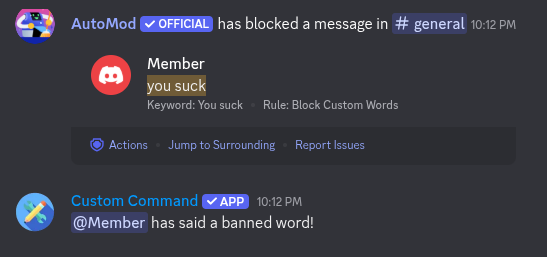
This can be done using %automod_action% as trigger, it makes the command execute when a user triggers a Discord AutoMod rule. The user who is flagged is the command executor.

Example
Output
Any message

From time to time you may not know what the message content will be, you can make cc trigger to any message sent in a channel.

How does it work?

This can be done using %all% trigger, it makes the command execute regardless of the content.

Message complimenter

Let's make a command which will randomly compliment every sent message to a specific channel.

To randomize the output, we will use $randomText function, and to restrict the channels we will use the Run only in dropdown menu:
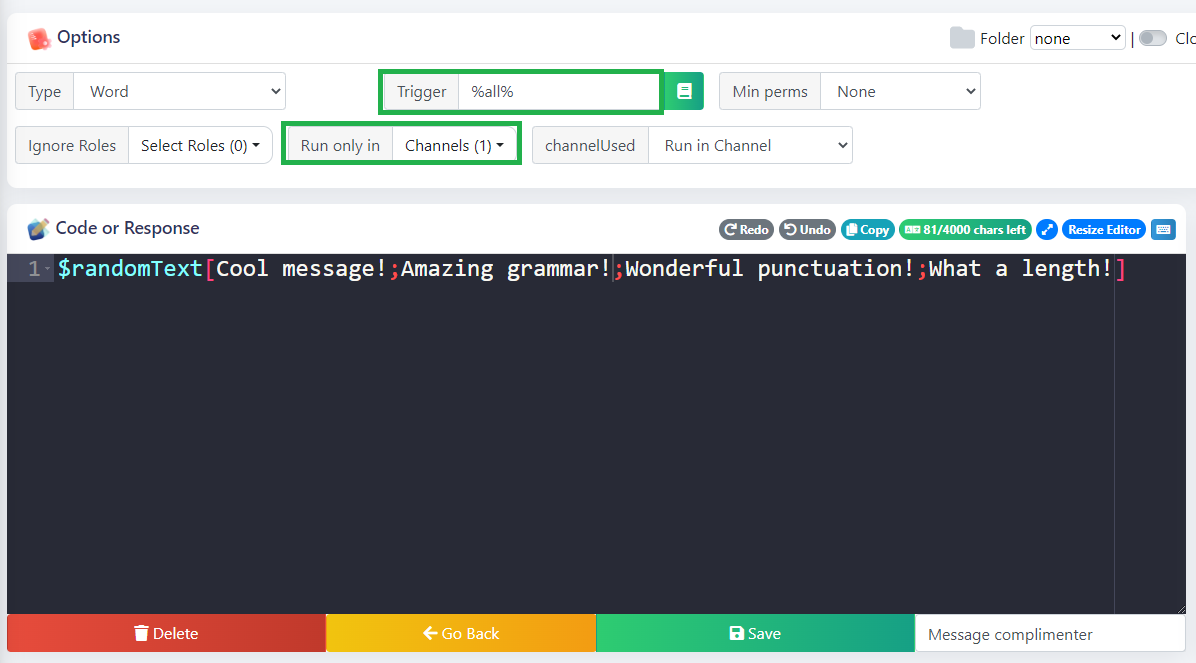
Message complimenter

Let's see if we get any compliments:

Member08/02/2026
How is it going?
Custom Command Bot 08/02/2026
Cool message!
Member08/02/2026
Does anyone here have a monkey as a pet?
Custom Command Bot 08/02/2026
Wonderful punctuation!

Amazing, we've just got complimented by the bot automatically.

🎉 Congratulations

If you read all of the information above, you became a real word trigger master!

Summary

As we got through all the examples, here's a summary of the word trigger:

NameSyntaxExampleExplanation
Wordword!pingTriggers on a message starting with !ping
Multiple wordsword|word...!ban|!unfriend|!gulagFires off on !ban, !unfriend or !gulag
Case insensitiveword|iapple|iMatches with apple and any case variations like ApPLe
Regex/RegExp//<@&\d{18,}>/Detects a user mention anywhere in a message
Any message*%all%%all%Triggers on ANY message
Message Pin%pin%%pin%Triggers on Discord system pin message
Thread Creation%thread_created%%thread_created%Triggers on Discord system thread creation message
Message with Attachment%has_attachment%%has_attachment%Triggers when user's message has an attachnment
Message With Poll%has_poll%%has_poll%Triggers when a user sends a poll
Automod Action%automod_action%%automod_action%Triggers when a user violates Discord AutoMod rules

One word only!

In word trigger (besides Regex) you are not allowed to put more than one word. All other words are interpreted as parameters, and cannot overlap with the trigger.

Any message*

Using %all% will result in a slight spam of cooldown messages, and might occasionally override your other commands.

We strongly advise you to set the Run only in dropdown menu to specific channel(s).

To get rid of the cooldown messages completely, you can either set a channel slowmode, or get yourself a premium bot.

Continue reading

Here are some pages that might come in handy if you still have some doubts about the word trigger:

  • !report - word command tutorial
  • $message - loading parameters
  • $msg - to load info about the message
Improve This Page!
Prev
Voice Join/Leave