$modal
Used to display a modal window to the user in response to an interaction like a button click, menu selection, or slash command. This allows you to collect information from the user directly within Discord.
Usage: $modal[Input]
The $modal function requires a specific input format to define the modal's structure.
Input Format:
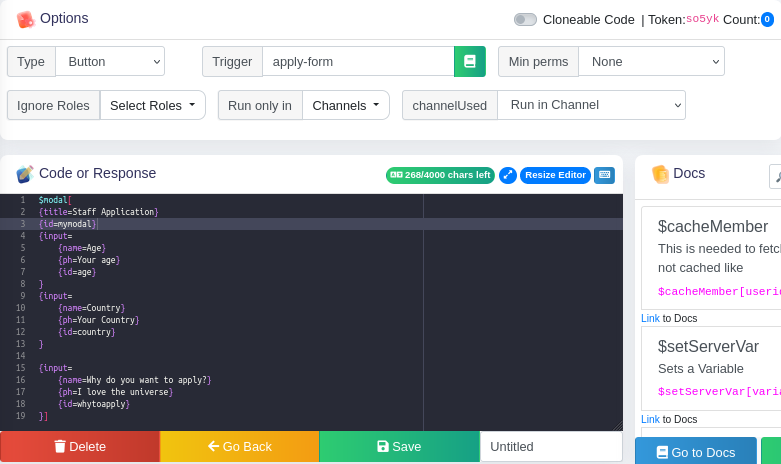
The input should be structured like this:
{title=Modal Title}
{id=Modal ID}
{input=
    {name=Input Field Name}
    {id=Input Field ID}
    {ph=Input Placeholder Text}
    {def=Input Default Value}
    {required=Is Input Required?}
    {min=Minimum Length}
    {max=Maximum Length}
    {type=Input Type}
}

{input=
    {name=Input Field Name}
    {id=Input Field ID}
    ...
}
Explanation of Properties:
title: The title of the modal window. Displayed at the top of the modal.id: A unique identifier for the modal. This ID is important for processing the user's input when the modal is submitted.input: Defines an input field within the modal. You can have multipleinputblocks (up to 5). Eachinputblock has the following properties:name: The label displayed next to the input field in the modal.id: A unique identifier for this specific input field. This is how you will access the value the user enters when the modal is submitted.ph: (Placeholder) The text displayed inside the input field when it's empty. Provides a hint to the user about what kind of input is expected.def: (Default Value) The initial value of the input field.required: Specifies whether the input field is mandatory. Acceptsyesorno. Defaults toyesif not specified.min: (Minimum Length) The minimum number of characters the user must enter.max: (Maximum Length) The maximum number of characters the user can enter.type: Specifies the type of input field:short: A single-line text input. This is the default if not specified.long: A multi-line text area.
Important Notes on Input Properties:
required: Must be eitheryesorno. If not specified, defaults toyes.type: Must be eithershortorlong. If not specified, defaults toshort.shortcreates a single-line text input, whilelongcreates a multi-line text area.input: You can define up to 5inputblocks within a single$modalfunction.
Example
Code
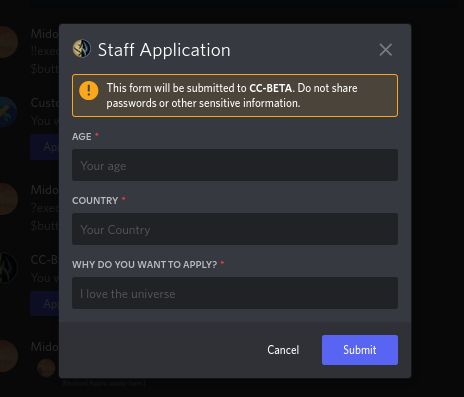
Output
TIP
This function can only be used within a modal trigger. The modal trigger handles the initial interaction (e.g., button press) and then uses $modal to display the modal to the user.