$reply
This command allows your bot to reply to a specific message within a channel. It's useful for referencing context or answering questions directly.
Usage
$reply[messageID (optional); mention on reply (yes/no, default is no)]
Explanation:
$reply[...]: The command itself.messageID (optional): The ID of the message you want the bot to reply to. If you omit this, the bot will reply to the message that triggered the command.mention on reply (yes/no, default is no): Determines whether the user who sent the original message should be pinged in the reply.yes: The user will be mentioned.no(or omitting this parameter): The user will not be mentioned.
Examples
Example 1: Reply to User Message with Ping
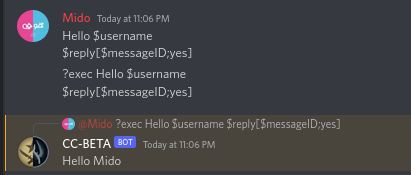
This example demonstrates how to reply to the user's message and ping them in the reply.
Hello $username!
$reply[$messageID;yes]
Explanation:
Hello $username!: Greets the user (using the$usernamevariable).$reply[$messageID;yes]: Replies to the message that triggered the command (becausemessageIDis not explicitly specified) and mentions the user.
Output:
Example 2: Reply to User Message without Ping
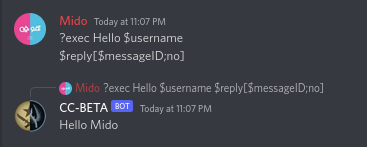
This example shows how to reply to the user's message without mentioning them.
Hello $username!
$reply[$messageID;no]
Explanation:
Hello $username!: Greets the user.$reply[$messageID;no]: Replies to the message that triggered the command and does not mention the user.
Output: