$editEmbed
Edit an existing embed within a specified message.
Usage
$editEmbed[channel id (optional);message id (optional);New data (curl);Embed Number (optional, default 1)]
Parameters:
- channel id (optional): The ID of the channel containing the message. If omitted, it defaults to the current channel.
- message id (optional): The ID of the message containing the embed you want to edit. If omitted, it's assumed you are editing a previous command's message.
- New data (curl): A string containing the modifications you want to make to the embed. This string uses a specific format (explained below) to define the changes.
- Embed Number (optional, default 1): The index of the embed to edit if the message contains multiple embeds. The first embed is
1, the second is2, and so on. Defaults to1.
Examples
Let's illustrate how to use $editEmbed with practical examples.
Initial Embed (Dummy Embed)
First, let's imagine we have a message containing the following embed:

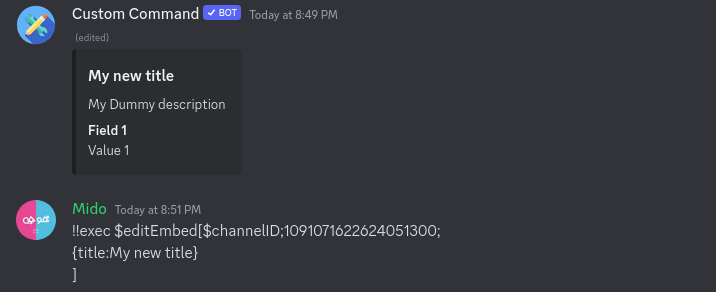
In this example, the message ID containing the embed is 1091071622624051300.
Editing the Title
To modify the title of the embed, use the {title:Your title} format.
Adding a Field
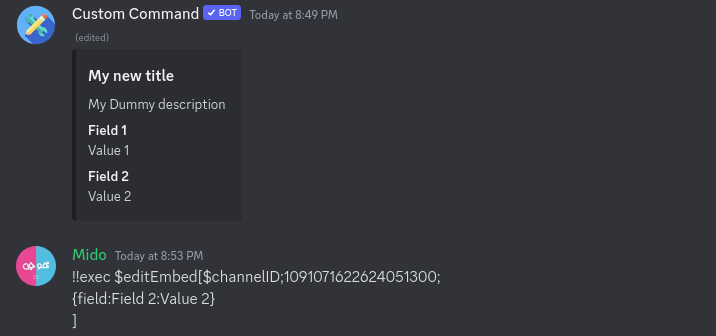
To add a new field to the embed, use the {field:Name:Value:inline} format. inline should be either true or false.
Editing a Field
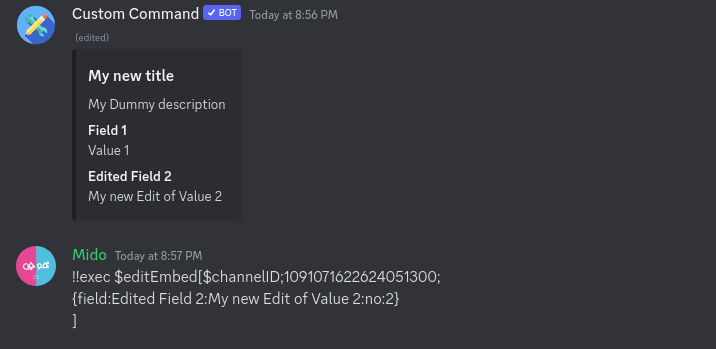
To edit an existing field, use the {field:Name:Value:inline:field number to edit} format. Remember that field numbers start at 1.
Editing Multiple Parts Simultaneously
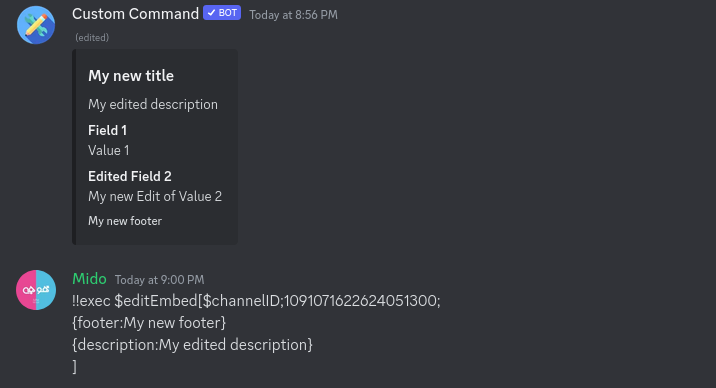
You can edit multiple aspects of the embed at once by combining the format strings:
{title:Your new title}
{description:Your new description}
Curl Format Reference
The New data (curl) parameter uses a specific format to define the modifications. Here's a comprehensive list:
| Format | Description |
|---|---|
{title:text} | Edits the title of the embed. |
{url:link} | Edits the URL associated with the title. |
{footer:text:url} | Edits the footer text and optional icon URL. |
{description:text} | Edits the description of the embed. |
{desc:text} | Alias for {description:text}. |
{color:hex} | Edits the color of the embed (using a hex code). |
{author:text:image url:link url} | Edits the author name, image URL, and link URL. |
{thumbnail:url} | Edits the thumbnail image URL. |
{field:name:value:inline} | Adds a new field. inline must be true or false. |
{field:name:value:inline:field number} | Edits an existing field. field number starts at 1. inline must be true or false. |
{timestamp:ms} | Edits the timestamp (in milliseconds since epoch). |
{image:url} | Displays a large image in the embed. |